
Diagnostics & Command Palette
Configuration information and shortcuts
Section titled “Configuration information and shortcuts”Open Tools → Site Health → Info → Site Essentials. Version, scope and configuration validity appear first, followed by network policy and operational information such as maintenance. Convenience features appear later.
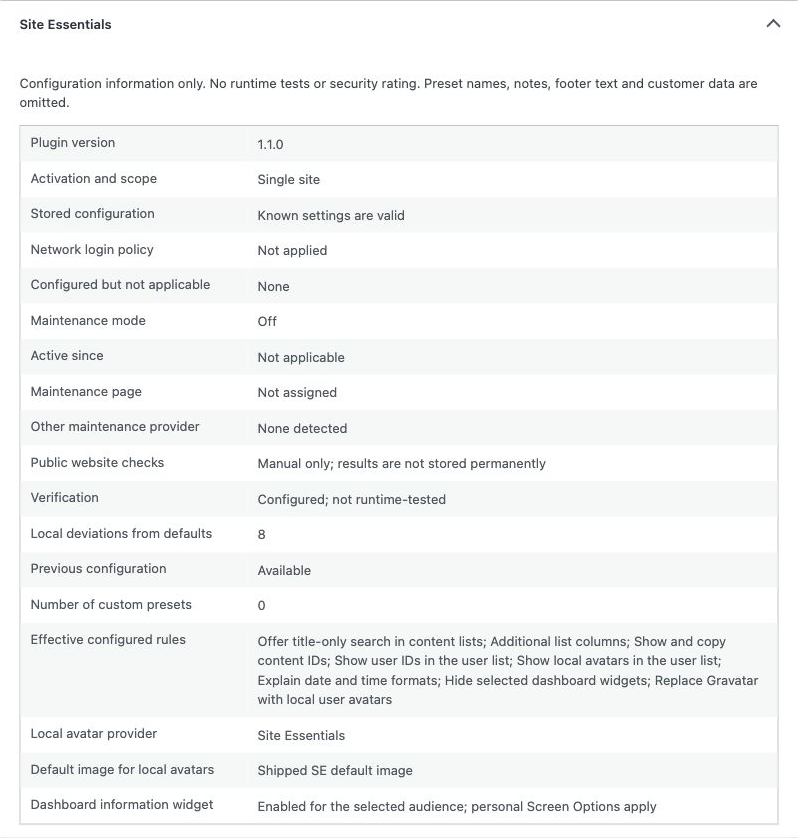
These are configuration states, not runtime tests or a security score. The section omits customer text, preset names and notes, selected users and image URLs/IDs. Copying the native Site Health report also copies information from WordPress and other plugins; review the complete report before sharing it.
Open settings through the command palette
Section titled “Open settings through the command palette”Where WordPress already provides its command palette, administrators can search for Site Essentials. Commands open settings, reports, website checks, maintenance, dashboard information and, while SE local avatars are active, the default-avatar controls. They navigate only; they never activate a feature or save changes.
Find stored settings without an effect
Section titled “Find stored settings without an effect”In the rule overview, select the stored but not applied count when it is nonzero. The overview opens the affected rules with reasons and setting shortcuts. A retained setting can be intentionally paused by another provider or a more comprehensive rule.
Website checks contains the manual public-response checks. Those checks are separate from Site Health configuration information.
Imported from the published release 1.1.0. Original source · Deutsch