

WORDPRESS PLUGIN · DECKERWEB
Multisite Toolbar AdditionsMultisite Toolbar AdditionsBring menus and administration shortcuts into the WordPress toolbar.
Many sites. One move.
Download Multisite Toolbar AdditionsVersion 4.2.1 · Plugin ZIP Direct ZIP download · no detoursView on GitHub ↗
Version 4.2.1WordPress 6.7+PHP 8.2+
Small tools. For your everyday WordPress work.
WHAT’S INSIDE
Good to know.
Ready to use.
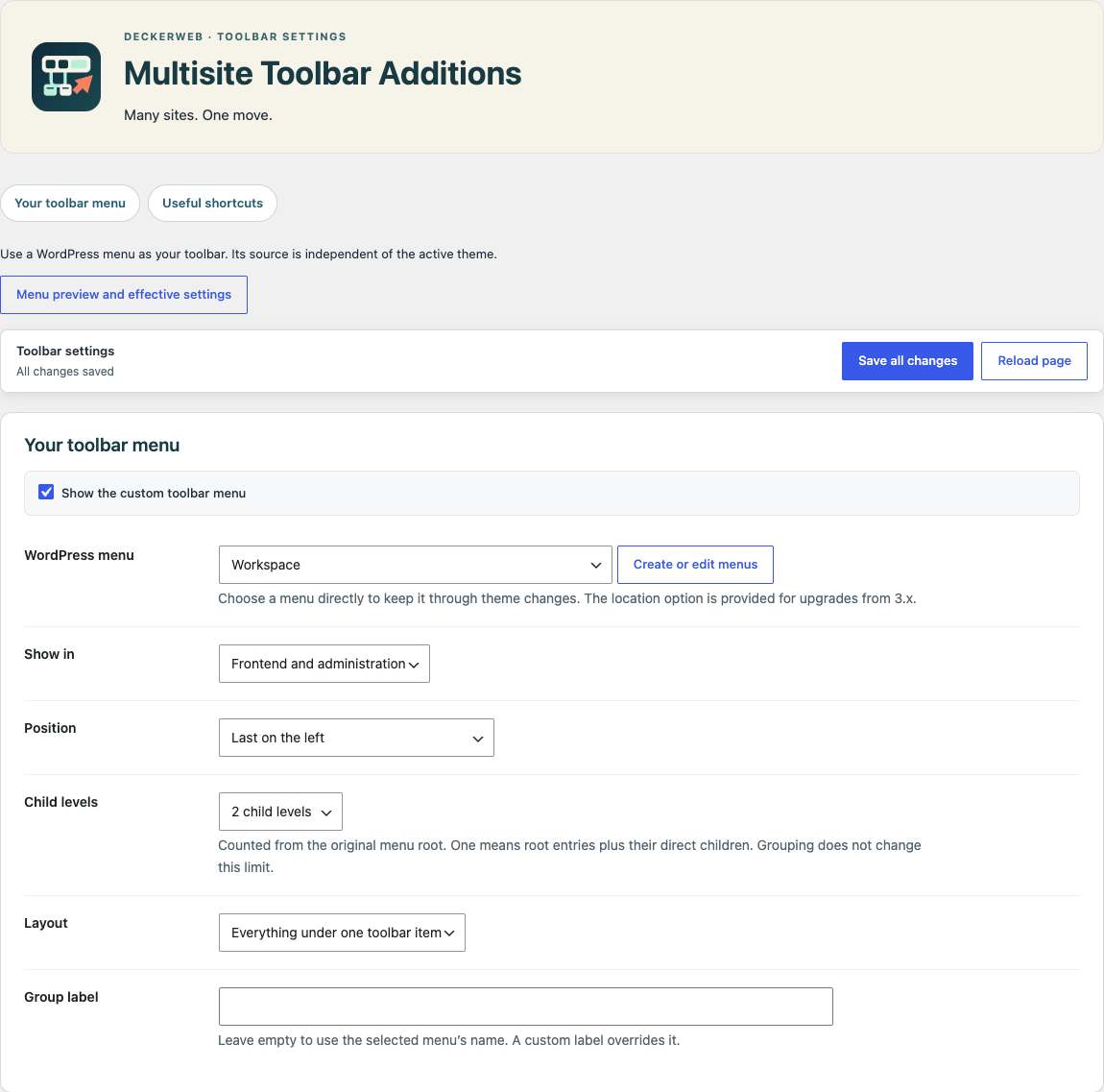
Choose first/last, before/after a reference item or the right side. Show the menu on the frontend, in administration or both. Choose one to ten child levels, or all. Missing references fall back to the end.
Plugins and Themes appear consecutively in the website toolbar menu, including Multisite. Additions under New remain last and have independent switches: Plugins on, Themes off. Both ZIP admin submenu links default to on. Upload links use available shared uploader pages or dedicated local pages with drag-and-drop and bounded metadata previews; WordPress performs installation.
Use one network-wide menu source with optional viewing by website administrators. Shared menus remain editable only by super administrators. Destination permissions still apply; website expansion is bounded.
Library 1.1.0 offers curated plugins with prerequisite/hash checks and optional online catalog updates. Updater 2.2.1 uses normal WordPress updates. Assets are local; no telemetry is collected.
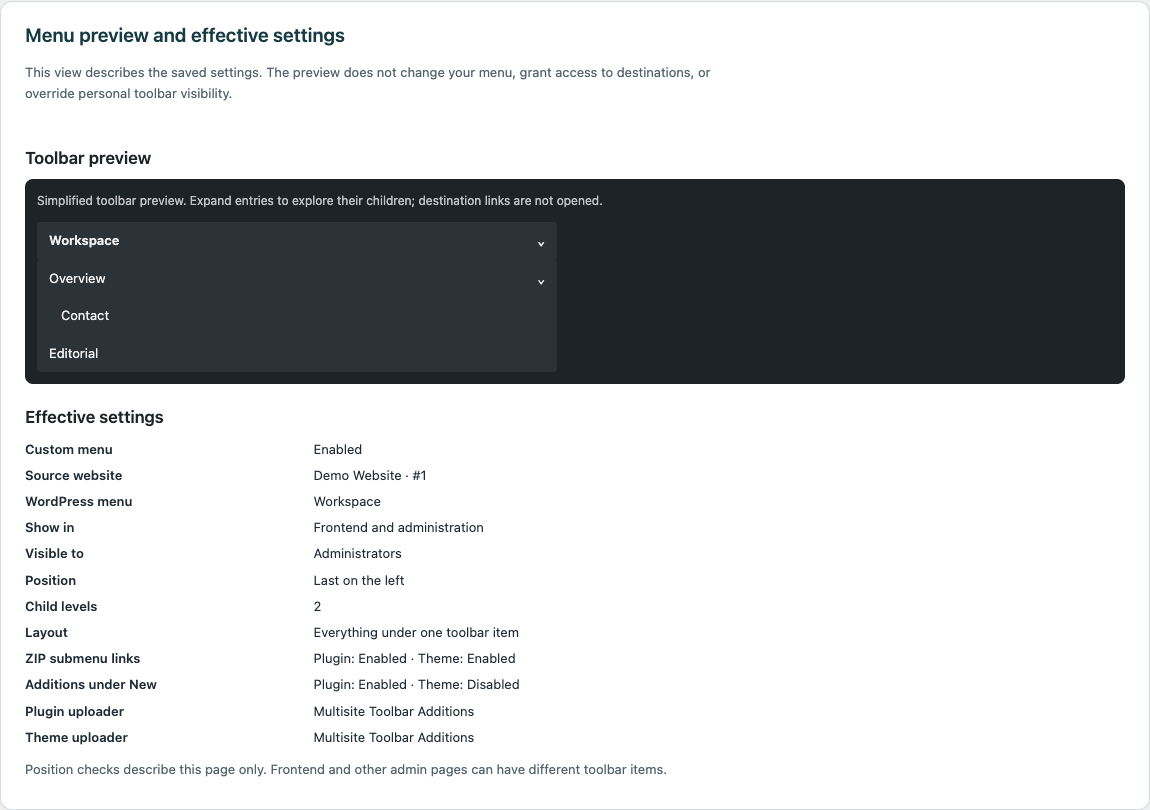
Inspect the menu structure with the selected depth and grouping without saving. A compact overview explains visibility, positioning and active uploader providers. Missing sources and page-specific missing toolbar anchors are explained.
Active DevKit Pro, WP Debug Toolkit and WP Admin Cleaner appear in a compact group below the website toolbar entry. Verified module and settings links are available to administrators and super administrators only. Plugin access restrictions remain respected. Keep the group below the website entry or place it on the right with one of three original icons. Its label is customizable. WP Debug Toolkit opens its installed Debug Viewer first, using the configured slug; plugin settings remain directly available.
The deckerweb catalog appears under New and Toolbar Settings when available. Library Settings remain accessible even when the catalog is hidden. Multisite links require an active network host and matching permissions.
A LOOK INSIDE THE PLUGIN
See it in action.
Is Multisite required?
No. Single WordPress sites and Multisite networks have both been supported since the first release in 2012. On a single site, you can use the configurable toolbar menu, plugin/theme ZIP uploaders, menu preview and settings. Multisite adds network administration and shared-menu features.
How do I select my toolbar menu?
Create a normal navigation menu and select its source site and menu in the settings. Network activation defaults to the main website; site-only activation defaults to the active website. Activate the plugin on the source website or across the network so that shared-menu protection can run. The legacy mstba_menu location remains a fallback.
Can I change position and visibility?
Yes: first, last, before or after a selected toolbar item, or on the right. Choose frontend, admin or both, and the permitted audience. If an anchor is missing, the menu falls back to the end.
Can ordinary site admins edit a shared menu?
The toolbar audience and permission to edit its source menu are separate. Shared Multisite source menus are protected against unauthorized admin, REST and Customizer changes.
YOUR NEXT STEP
A good fit for your
WordPress?
Download Multisite Toolbar AdditionsVersion 4.2.1 · Plugin ZIP Direct ZIP download · no detoursView on GitHub ↗
SMALL STEPS. GOOD CHANGES.
What’s new?
VERSION4.2.1
Full changelog ↗Changes
- Fixed: Updater 2.2.1 keeps this plugin’s update handling independent of older updater copies loaded by other plugins and clears its own versioned metadata caches on uninstall.
THE ESSENTIALS FOR YOUR WEBSITE
At a glance
- Version
- 4.2.1
- Released
- 22 October 2026
- WordPress
- 6.7+
- PHP
- 8.2+
- Guide
- Deutsch / English
- License
- GPL v2 or later
- Developer
- David Decker
FOR YOUR NEXT STEP
Documentation & help
Guides, answers and release histories are collected here in the documentation.