
WORDPRESS PLUGIN · DECKERWEB
GP Project Export NameGP Project Export NameGlotPress exports with recognizable project names, language codes and variants.
Download GlotPress translations with names that are easier to recognize and prepare for their destination. Choose a project name, keep the exported language and distinguish informal, formal or other translation sets. The translation itself stays unchanged.
Download GP Project Export NameVersion 2.0.0 · Plugin ZIP Direct ZIP download · no detoursView on GitHub ↗
Version 2.0.0WordPress 6.4+PHP 8.1+GlotPress 4.0+

Small tools. For your everyday WordPress work.
WHAT’S INSIDE
Good to know.
Ready to use.
Use the exported language, including formal and other variants.
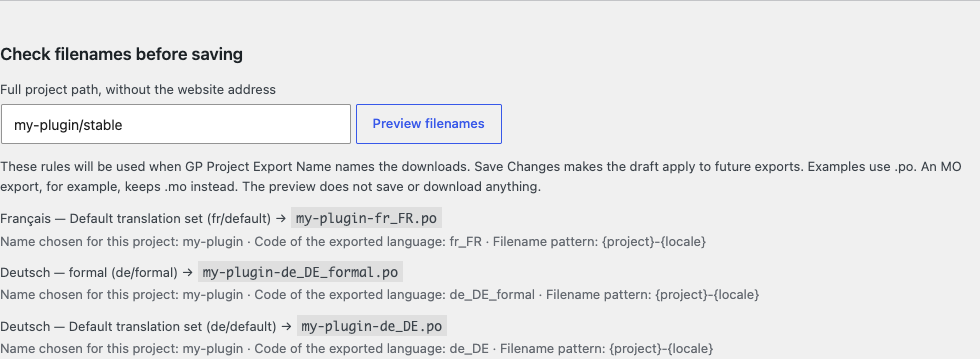
Check every translation set’s filename before saving changes.
Find projects without typing their full path.
Keep otherwise identical names distinct within a project.
Choose which recognized naming plugin is responsible.
Back up, transfer or reset filename settings after reviewing the changes.
Read the five-step quick guide directly on the settings page.
A LOOK INSIDE THE PLUGIN
See it in action.
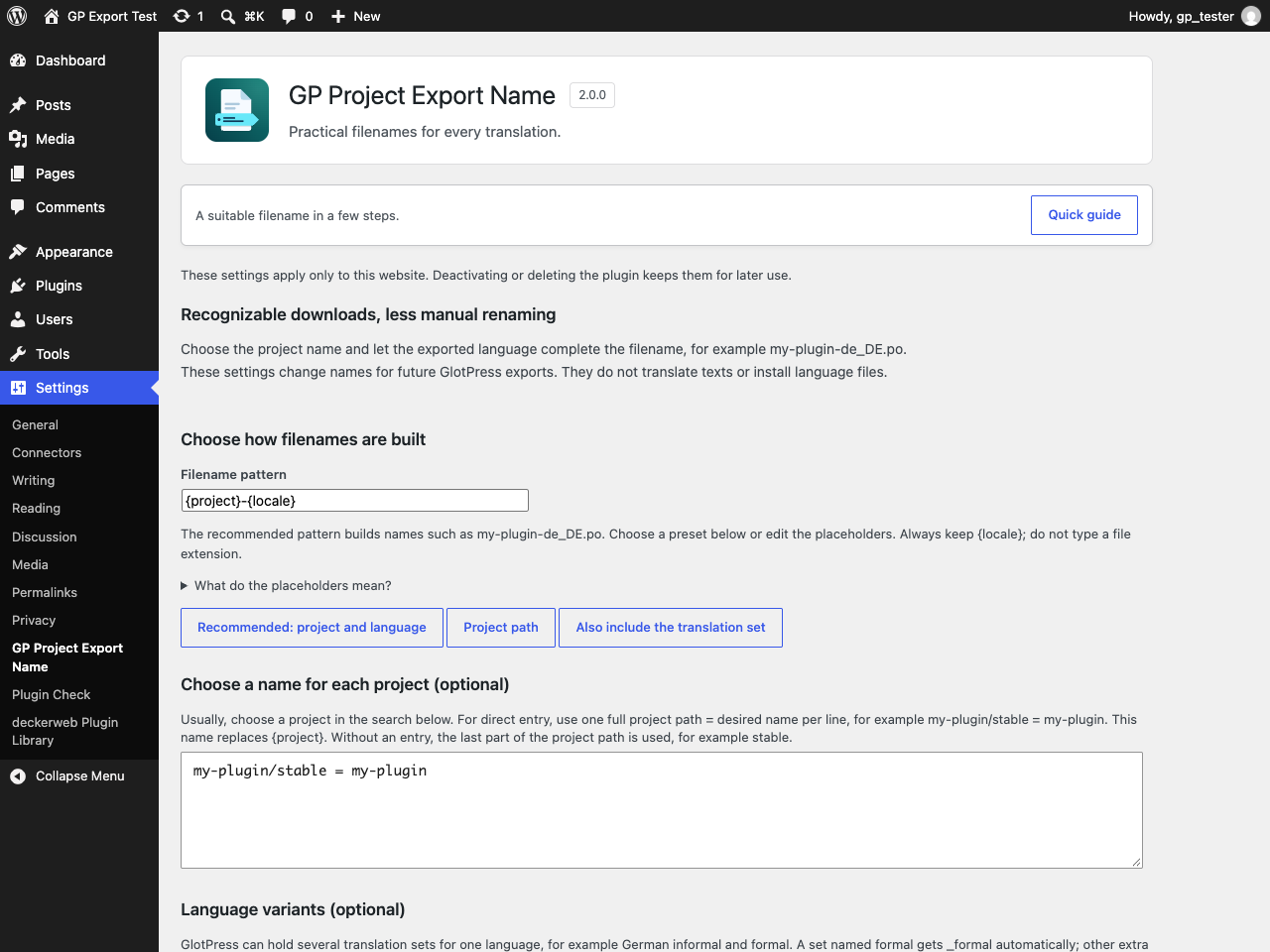
- Activate GlotPress 4.0+ and use a permalink structure other than Plain.
- Open Settings → GP Project Export Name and start with the recommended pattern.
- Choose a project name if needed, then check the filenames in the preview.
- Save the rules and export in GlotPress as usual.
Requirements & limits
Requires GlotPress 4.0+ and a permalink structure other than Plain under Settings → Permalinks. Export features pause without these requirements; settings and the quick guide remain available.
When moving from 2018.09.15, upload the installation ZIP and confirm replacement once. WordPress considers that date-based number higher than 2.0.0. Back up the website first; do not delete the old plugin beforehand.
The plugin changes export filenames, not translation contents. Export translations in GlotPress as usual; a filename alone does not install a language file.
Do I need to fill in every field?
No. Keep the recommended filename pattern. Choose a project name only if the last part of its GlotPress path is unsuitable, then preview and save. Custom language codes and backup/reset tools are optional.
Which name should I use for a WordPress plugin?
Use that plugin’s actual text domain: the identifier it uses for translations, for example my-plugin. The project’s display title is not necessarily its text domain. A correct filename still needs the right format, language code and file location in WordPress.
Where do I download the translation?
Use the normal export link inside the translation set in GlotPress. This settings page only configures names and shows examples; it does not download or install translations.
Does it change translation contents?
No. Only download names change. GlotPress retains access control and export contents.
YOUR NEXT STEP
A good fit for your
WordPress?
Download GP Project Export NameVersion 2.0.0 · Plugin ZIP Direct ZIP download · no detoursView on GitHub ↗
SMALL STEPS. GOOD CHANGES.
What’s new?
VERSION2.0.0
Full changelog ↗Changes
- New: Configure project names, filename patterns and language variants on a dedicated settings page, with project search and a live preview.
- New: Use backup, reviewed import and selective reset tools; open the five-step quick guide at any time.
- New: Includes the deckerweb Library and validated GitHub updates.
- Improved: Use the exported translation’s language, distinguish formal and custom sets, and prevent filename collisions within a project.
- Improved: Choose responsibility when other recognized filename plugins are active.
- Improved: Adds accessible bilingual documentation, illustrated instructions and the plugin icon.
- Fixed: Keep the original GlotPress filename when a generated name is invalid; preserve export contents and compound file extensions.
- Misc: Requires WordPress 6.4, PHP 8.1 and GlotPress 4.0 or newer. Settings belong to each website and remain after uninstall.
- Misc: From version 2018.09.15, upload the ZIP and confirm replacement because WordPress compares the old date-based version as newer.
THE ESSENTIALS FOR YOUR WEBSITE
At a glance
- Version
- 2.0.0
- Released
- 27 October 2026
- WordPress
- 6.4+
- PHP
- 8.1+
- Guide
- Deutsch / English
- License
- GPL v2 or later
- Developer
- David Decker
FOR YOUR NEXT STEP
Documentation & help
Guides, answers and release histories are collected here in the documentation.