
WORDPRESS PLUGIN · DECKERWEB
Builder Content GuideBuilder Content GuideExplain maintenance tasks and open the right original content editor.
Find the right website building block, understand what a change affects, and open its original editor. The website administrator curates a small handover guide; content stays in WordPress and its active builders. You do not need a guide for every content item. Start with frequent maintenance tasks, common stumbling blocks and shared templates whose changes affect several places.
Download Builder Content GuideVersion 1.0.1 · Plugin ZIP Direct ZIP download · no detoursView on GitHub ↗
Version 1.0.1WordPress 7.0+PHP 8.1+
Small tools. For your everyday WordPress work.
WHAT’S INSIDE
Good to know.
Ready to use.
Open the original WordPress or builder editor with existing permissions.
Explain usage, effects and numbered editing steps.
Curate WordPress content, navigation and active builder templates.
Provide reader help and an optional support contact.
Choose reader roles and adapt the admin menu label and icon.
Copy guide links and duplicate guides into hidden drafts.
A LOOK INSIDE THE PLUGIN
See it in action.
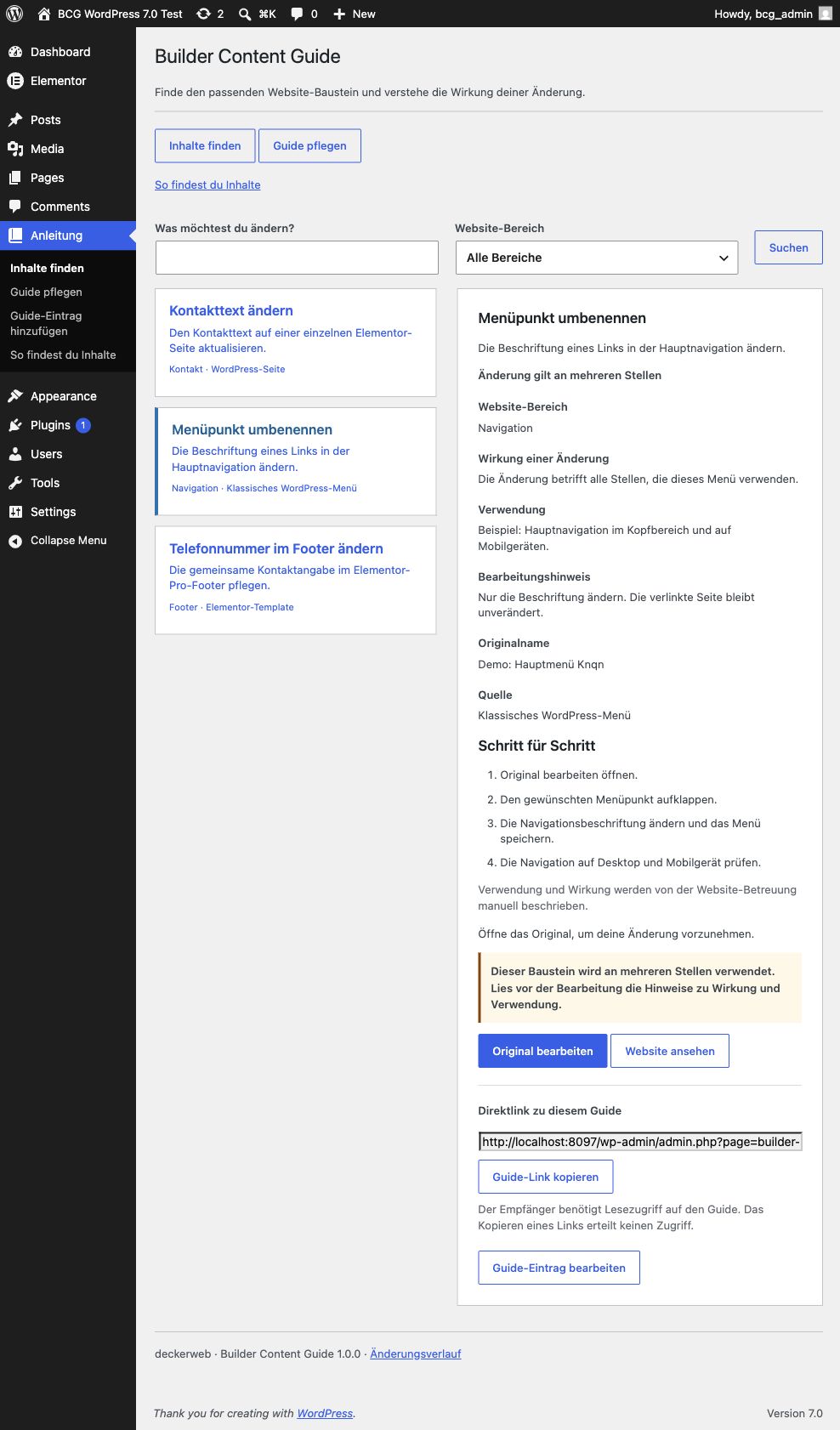
- Install the supplied plugin ZIP on a staging website and activate Builder Content Guide.
- Open Find content → Manage guide as a website administrator.
- Pick a few useful tasks, such as renaming a menu item, updating the footer phone number or maintaining a shared contact template.
- Add a guide entry, choose an original and describe name, purpose, area, effects, usage and editing guidance.
- Enable visibility deliberately. Under Guide access, explicitly select the roles that may read visible entries.
- Try three actual maintenance tasks with an editor before using the guide for a client handover.
Does every content item need a guide?
No. Focus on typical problem cases, common stumbling blocks and frequently edited templates. A few clear instructions can be more useful than a complete catalog.
Does the guide copy templates?
No. It stores original references and explanations. Original content remains in its own system.
Does visibility grant editing permission?
No. Reader access only reveals curated explanations. WordPress object permissions and Bricks builder permissions still control editing.
Are usage and effects detected automatically?
No. The administrator describes them manually. Unknown effects are labeled Check usage. No automatic usage counts are shown.
YOUR NEXT STEP
A good fit for your
WordPress?
Download Builder Content GuideVersion 1.0.1 · Plugin ZIP Direct ZIP download · no detoursView on GitHub ↗
SMALL STEPS. GOOD CHANGES.
What’s new?
VERSION1.0.1
Full changelog ↗Changes
- Improved: Updated plugin catalog and GitHub update support.
- Fixed: The changelog remains closed until requested and keeps a documentation fallback.
- Misc: Requires PHP 8.1 or later; WordPress 7.0 remains the minimum.
THE ESSENTIALS FOR YOUR WEBSITE
At a glance
- Version
- 1.0.1
- Released
- 22 October 2026
- WordPress
- 7.0+
- PHP
- 8.1+
- Guide
- Deutsch / English
- License
- GPL v2 or later
- Developer
- David Decker
FOR YOUR NEXT STEP
Documentation & help
Guides, answers and release histories are collected here in the documentation.