

WORDPRESS PLUGIN · DECKERWEB
WPCodeBox QuickNavWPCodeBox QuickNavReach WPCodeBox 2 snippets, favorites and folders directly from the toolbar.
Keep your WPCodeBox 2 snippets one click closer: personal favorites, search across all folders and more room in the editor. WPCodeBox QuickNav adds convenient shortcuts to the WordPress toolbar and helps you understand the inclusion state of your separately generated Functionality Plugin. WPCodeBox 2 is required separately and is not included.
Download WPCodeBox QuickNavVersion 1.0.0 · Plugin ZIP Direct ZIP download · no detoursView on GitHub ↗
Version 1.0.0WordPress 6.9+PHP 8.3+

Small tools. For your everyday WordPress work.
WHAT’S INSIDE
Good to know.
Ready to use.
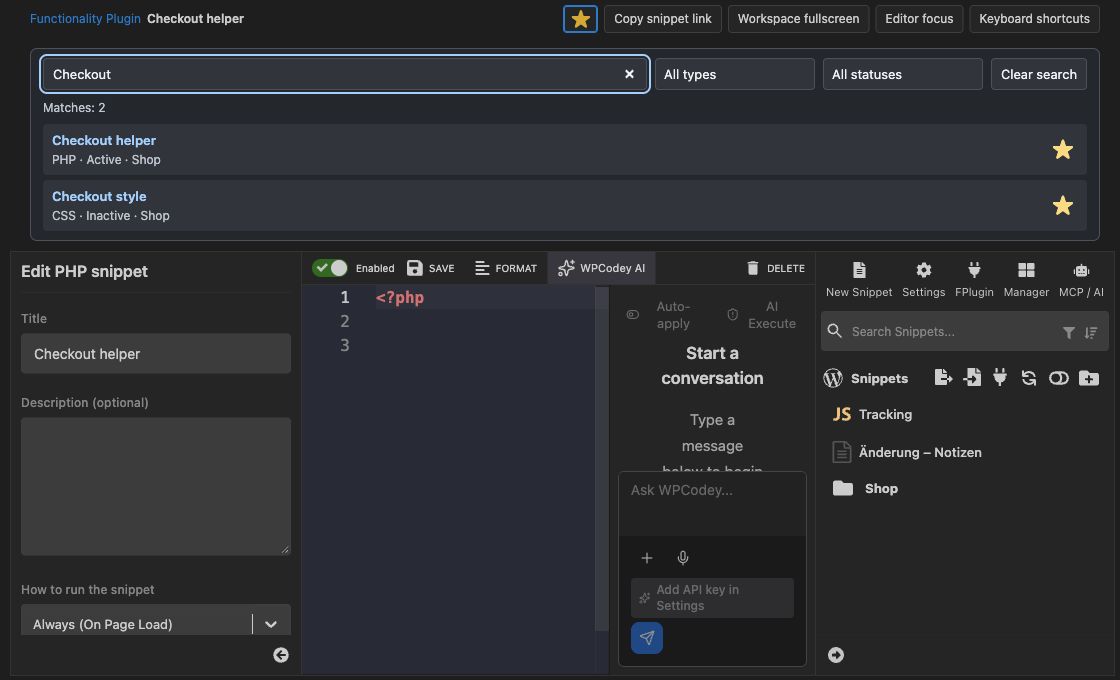
Find snippets across folders
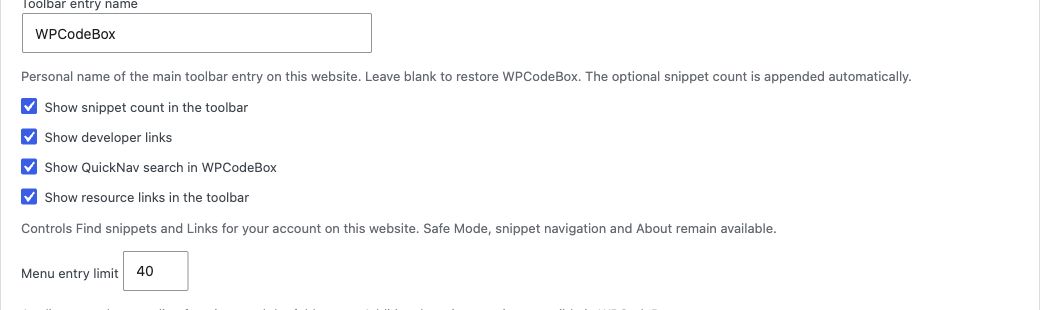
Toolbar and menu
Fullscreen and editor focus
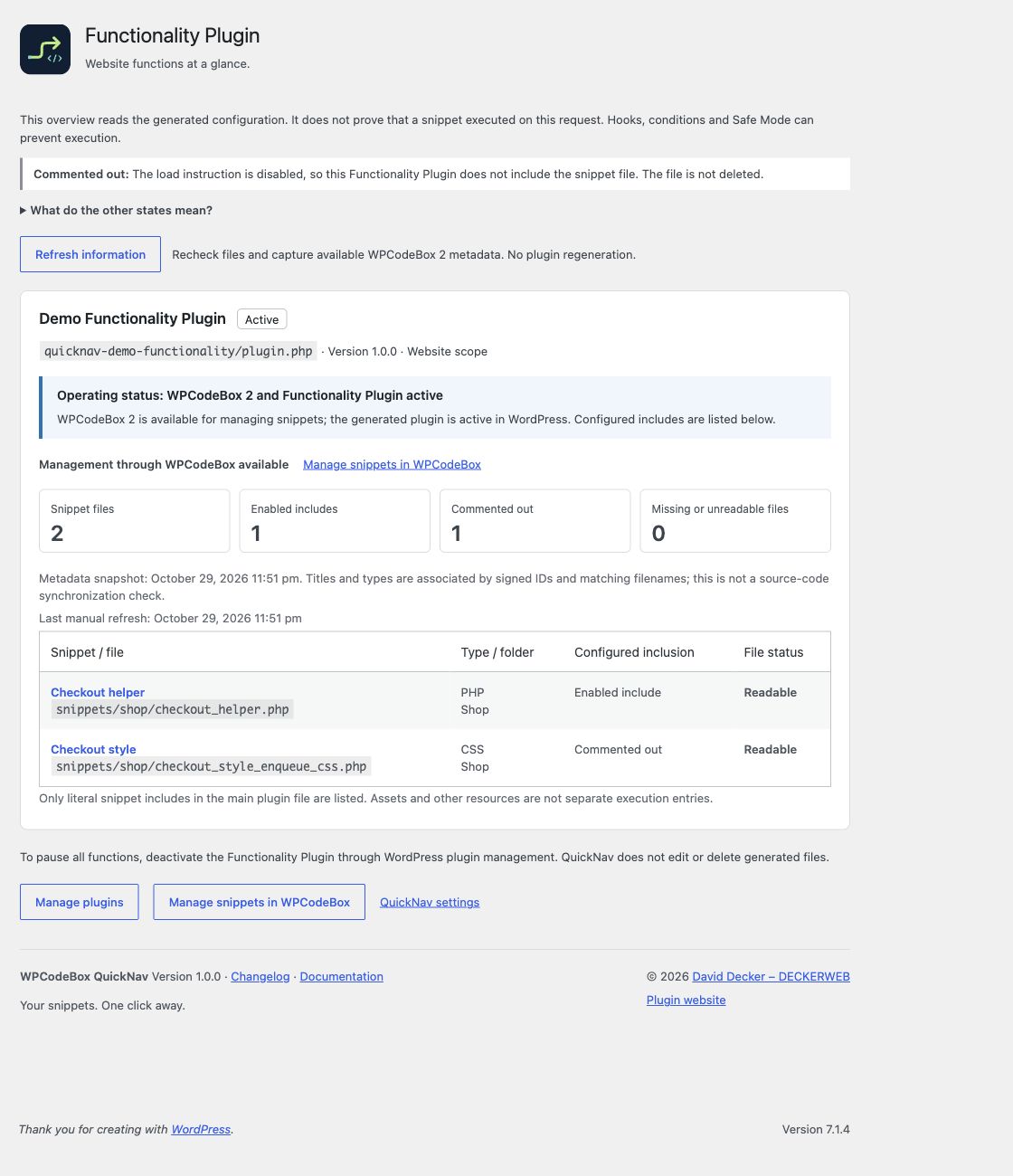
Functionality Plugin overview
Commands, Safe Mode and resources
A LOOK INSIDE THE PLUGIN
See it in action.
Real views of example configurations. Select an image to enlarge it with its caption and browse the other views. The selections shown are not defaults.



Requirements & limits
Requires WPCodeBox 2 version 1.4.1 or newer, WordPress 6.9 and PHP 8.3. WPCodeBox V1 is not supported. WPCodeBox is available separately.
Which WPCodeBox version is supported?
The integration supports only WPCodeBox 2 version 1.4.1 or newer. WPCodeBox V1 is not supported. With WPCodeBox 2 inactive, settings and the Functionality Plugin overview remain available. The QuickNav toolbar remains available when a managed Functionality Plugin is detected. Individual snippets are managed in WPCodeBox; direct editor links appear only when the integration is available.
How do I leave fullscreen and focus?
Use Back to normal view at the top or press Escape. Close an open dialog or editor completion first. Views are temporary and reset on page navigation. Browser fullscreen is not enabled.
What data is stored?
Favorites and display preferences per user and website, plus dated Functionality Plugin metadata per website. No snippet source or execution logs are stored. Deactivation and uninstall retain these records and all WPCodeBox data. Temporary update data is cleared; Library cleanup respects other installed hosts.
What connects to external servers?
The Updater can check public stable GitHub releases. Automatic updates are not enabled. The optional Library online catalog is off by default. Requests send standard HTTP/WordPress/PHP metadata, without snippet code or favorites. Resource links contact their destination when opened.
How does Multisite work?
Favorites, preferences and metadata snapshots remain site-specific. The overview distinguishes site and network activation. It lives in website administration; there is no network-wide snippet collection. Network-active plugins must be deactivated through Network Admin.
Does QuickNav modify generated plugins?
No. QuickNav reads configuration without executing plugin files for inspection. Manage plugins opens native WordPress plugin management to pause the entire Functionality Plugin. The upstream WPCodeBox disable operation can remove the generated plugin; use native WordPress deactivation for a simple pause.
Functionality Plugin: What do “active” and “enabled include” mean?
These labels belong to the QuickNav overview of the Functionality Plugin generated by WPCodeBox. They describe its configuration, not which snippets actually executed. “Plugin active” means that the Functionality Plugin is activated in WordPress. “Enabled include” means that the snippet is configured to load in the generated main file; its include statement is not commented out. Whether the snippet code actually runs also depends on conditions, hooks and Safe Mode, for example. Errors may also prevent execution. For example, a snippet intended to run only on the frontend does not have to execute during an admin request, even when its include is enabled. QuickNav does not record actual executions.
YOUR NEXT STEP
Your snippets.One click closer.
Download WPCodeBox QuickNavVersion 1.0.0 · Plugin ZIP Direct ZIP download · no detoursView on GitHub ↗
Installation & first steps ↗SMALL STEPS. GOOD CHANGES.
What’s new?
VERSION1.0.0
Full changelog ↗Changes
- New: Quick access to WPCodeBox 2 snippets through favorites, status lists, folders and cross-folder search.
- New: Fullscreen workspace, editor focus, configurable keyboard shortcuts and compact shortcut help.
- New: Independent Functionality Plugin inventory with clear inclusion states and retained metadata.
- New: Persistent red Safe Mode warning with flame in the admin and frontend toolbar.
- Improved: Viewport-aware editor panels, personal naming and optional remembered workspace views.
THE ESSENTIALS FOR YOUR WEBSITE
At a glance
- Version
- 1.0.0
- Released
- 4 November 2026
- WordPress
- 6.9+
- PHP
- 8.3+
- Guide
- Deutsch / English
- License
- GPL v2 or later
- Developer
- David Decker
FOR YOUR NEXT STEP
Documentation & help
Guides, answers and release histories are collected here in the documentation.